Session Volume Profile
Overview
Session Volume Profile shows how traded volume was distributed across price levels within each trading session. Every session is drawn as a horizontal histogram with its Point of Control (POC) — the price level with the highest traded volume — and its Value Area, the price range that contains the specified share of the session volume.
Unlike Volume Profile Visible Range and Volume Profile Fixed Range, which build a single profile for the visible or selected range, Session Volume Profile splits history into sessions and builds a separate profile for each of them.
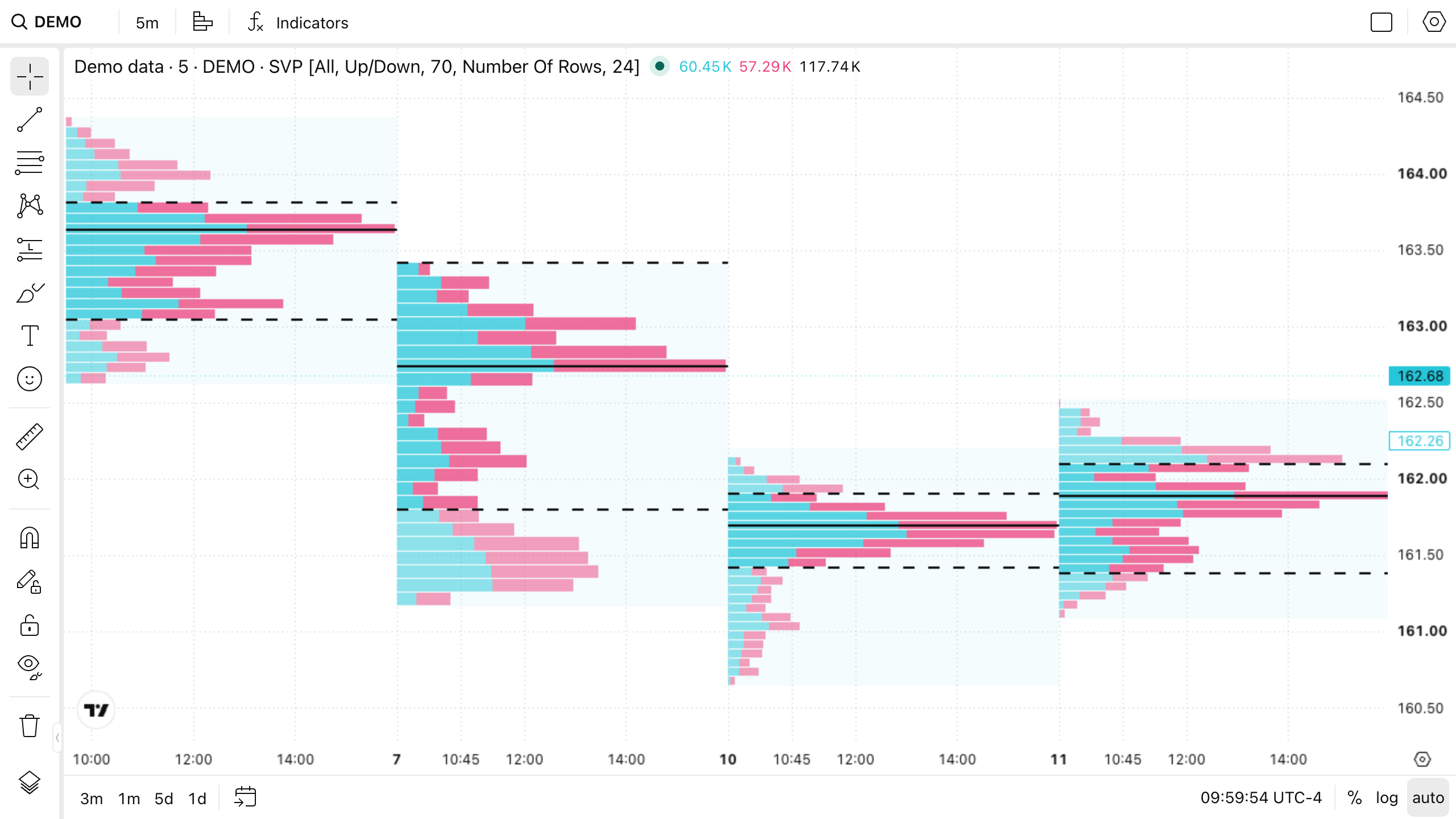
Session Volume Profile is available in two forms that use the same calculation. They differ in where the settings live and in how the custom session time zone is resolved:
| Chart type | Indicator | |
|---|---|---|
| Settings dialog | Settings | Indicator settings |
| Customization | mainSeriesProperties.svpStyle overrides | Indicator overrides |
| Custom session time zone | The chart time zone | The Custom session timezone input |
Chart type
Session Volume Profile is SeriesType.SVP with the numeric value 20. Users select it in the chart type menu; you can set it programmatically or through overrides.
widget.activeChart().setChartType(20);
When Session Volume Profile is the chart type, the chart displays profiles only: the price bars of the main series are not drawn.
Indicator
Session Volume Profile is added like any other indicator — from the Indicators dialog or with createStudy. The indicator is displayed on top of the current chart type.
widget.activeChart().createStudy('Session Volume Profile', false);
Inputs
| Input | Default | Values |
|---|---|---|
| Sessions | All | All, Each (pre-market, market, post-market), Pre-market only, Market only, Post-market only, Custom |
| Custom session | 0930-1600 | A session in the HHMM-HHMM or HHMM-HHMM:days format |
| Custom session timezone | Exchange | The exchange time zone or a named time zone. Available in the indicator only |
| Volume | Up/Down | Up/Down, Total, Delta |
| Value Area Volume | 70 | 0–100. The share of the profile volume that forms the Value Area, in percent |
| Rows Layout | Number Of Rows | Number Of Rows, Ticks Per Row |
| Row Size | 24 | 1–1000000. A row count or a number of ticks per row, depending on Rows Layout |
| Extend POC Right | false | Extends the Point of Control line to the right of its session |
| Extend VAH Right | false | Extends the Value Area High line to the right of its session |
| Extend VAL Right | false | Extends the Value Area Low line to the right of its session |
All builds one profile per trading day. Each (pre-market, market, post-market) and the three single-phase values build one profile per session phase and require a symbol with pre-market and post-market subsessions. On a symbol without them, every in-session bar counts as market hours. Custom builds one profile per occurrence of the Custom session window.
Bars outside the selected session are not included in the profile.
A bar that spans several rows distributes its volume across them proportionally to the price overlap, so the bar's total volume is preserved instead of being assigned to a single row.
Customization
The chart type exposes nine inputs and the appearance settings through the mainSeriesProperties.svpStyle.* chart overrides. You can apply them in overrides or at runtime with setChartStyleProperties.
widget.activeChart().getSeries().setChartStyleProperties(20, {
    inputs: { profilesSessions: 'Each (pre-market, market, post-market)', rows: 48 },
    poc: { visible: true, linewidth: 2 },
});
The indicator is customized through SessionVolumeProfileIndicatorOverrides.
Datafeed requirements
Volume
Session Volume Profile requires volume data. For a symbol whose bars carry no volume, the indicator reports an error.
Supported resolutions
Session Volume Profile supports intraday resolutions and 1D. On a coarser resolution, such as 2D, weekly, or monthly, it reports an error and asks the user to switch to a lower one.
Detailed data
To build an accurate profile, the indicator can request an additional series at a resolution finer than the chart. The request goes through the same getBars method as any other series, so your datafeed should either serve that resolution or reject it through onErrorCallback.
On time-based charts, the detailed resolution is selected as follows:
- If you implement
getVolumeProfileResolutionForPeriodand return a resolution finer than the chart resolution, your result is used. This is the recommended way to keep control over the request. - Otherwise, the indicator picks the advertised resolution closest to its internal default without being coarser than that default. If no advertised resolution is that fine, it uses the finest advertised resolution that is still finer than the chart resolution.
The list comes from the symbol's
supported_resolutions, or from the datafeed configuration when the symbol does not provide its own. Thehas_secondsandhas_ticksflags are respected for the seconds and ticks bands. - If nothing finer is available, the profile is built from the chart's own bars.
Tick charts always use their displayed tick bars, because finer tick bars cannot be mapped completely to a displayed bar by timestamp.
History and performance
By default, Session Volume Profile draws over the range that the chart itself has loaded: profiles stop where the chart history stops, and scrolling back loads more of them. There is no fixed recent-history window.
volume_profile of the Widget Constructor adjusts this behavior through the following properties.
history_sessions
volume_profile.history_sessions sets how many trading sessions of history the indicator should initially cover.
It adds a minimum-history request that extends the chart history to fit those sessions. This is a prefetch floor rather than a limit: normal scroll-back remains available.
enabled_features: ['studies_extend_time_scale'],
volume_profile: {
    history_sessions: 40,
},
Consider the following:
- The parameter requires the
studies_extend_time_scalefeatureset. Without it, the parameter has no effect. - The time scale is shared, so extending it affects every source on the chart, not only this indicator.
- Values below
1are ignored, and values above500are clamped. - As protection against amplified initial requests, the parameter contributes at most 200,000 bars to the minimum
countBackof each affected series. Therefore, high-frequency data may cover fewer sessions than requested. Tick resolutions always use this 200,000-bar contribution, because a session duration cannot predict how many ticks it contains.
max_total_rows
volume_profile.max_total_rows limits the total number of histogram rows that a volume profile indicator keeps across all profiles it has drawn. The default value is 6000. Values below 100 are ignored.
Once new profiles would push Session Volume Profile past the limit, its oldest profiles are dropped. This is what bounds how far back the indicator draws.
Raising the limit lets profiles cover more history at the cost of memory and of the time spent serializing and laying out the extra rows. Increase it gradually and measure.
The parameter applies to every volume profile indicator, including Volume Profile Visible Range and Volume Profile Fixed Range. Since these indicators draw a single profile, they report an error instead of dropping profiles when their histogram exceeds the limit.