Multiple-chart layout
Overview
Trading Platform can display up to 8 charts in one layout. Users switch between layouts with the Select Layout button on the top toolbar. Charts can be synchronized by a symbol, interval (resolution), crosshair, time, and date range.
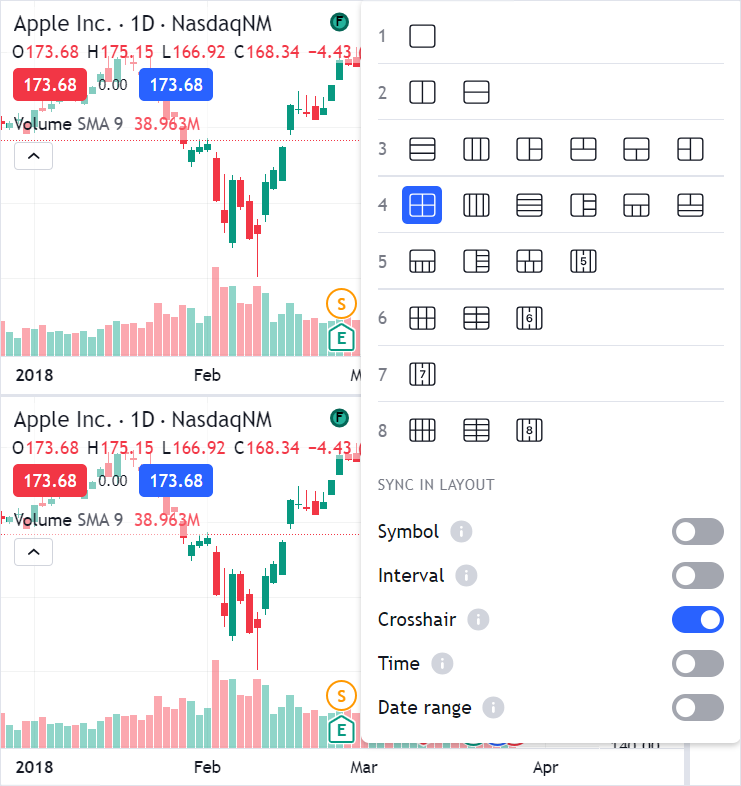
Multiple-chart layouts are enabled by default.
To disable them, add the header_layouttoggle and support_multicharts featuresets to the disabled_features array of the Widget Constructor.
Layout types
Every layout is identified by a string of the LayoutType type: 's' for the single-chart layout, and one of the MultipleChartsLayoutType values for the rest.
The identifier encodes how the space is divided:
| Identifier | Meaning | Example |
|---|---|---|
s | A single chart. | 's' |
<n>h | n charts in one row, side by side. | '3h' |
<n>v | n charts in one column, stacked. | '3v' |
<a>-<b> | a charts in the top row, b charts in the bottom row. | '2-3' |
<n> | n charts in a two-row grid. | '6' |
<n>c | n charts in a two-column grid. | '6c' |
<n>s | One full-height chart plus a column of n - 1 charts. | '4s' |
Layout reference
The diagrams below show every value of MultipleChartsLayoutType.
The number in each cell is the chart index that you pass to chart to access that chart, for example widget.chart(2).
2 charts
2h         2v
+---+---+  +---+
| 0 | 1 |  | 0 |
+---+---+  +---+
           | 1 |
           +---+
3 charts
3h             3s         3r         2-1        1-2
+---+---+---+  +---+---+  +---+---+  +---+---+  +-------+
| 0 | 1 | 2 |  |   | 1 |  | 0 |   |  | 0 | 2 |  |   0   |
+---+---+---+  | 0 +---+  +---+ 2 |  +---+---+  +---+---+
               |   | 2 |  | 1 |   |  |   1   |  | 1 | 2 |
               +---+---+  +---+---+  +-------+  +---+---+

3v
+---+
| 0 |
+---+
| 1 |
+---+
| 2 |
+---+
4 charts
4          4h                 1-3            3-1
+---+---+  +---+---+---+---+  +-----------+  +---+---+---+
| 0 | 2 |  | 0 | 1 | 2 | 3 |  |     0     |  | 0 | 1 | 2 |
+---+---+  +---+---+---+---+  +---+---+---+  +---+---+---+
| 1 | 3 |                     | 1 | 2 | 3 |  |     3     |
+---+---+                     +---+---+---+  +-----------+

4s         4s-l       2-2-l          2-2-r          2-2
+---+---+  +---+---+  +---+---+---+  +---+---+---+  +---+---+
|   | 1 |  | 1 |   |  |   |   | 2 |  | 0 |   |   |  | 0 | 1 |
|   +---+  +---+   |  | 0 | 1 +---+  +---+ 2 | 3 |  |   |   |
| 0 | 2 |  | 2 | 0 |  |   |   | 3 |  | 1 |   |   |  +---+---+
|   +---+  +---+   |  +---+---+---+  +---+---+---+  |   2   |
|   | 3 |  | 3 |   |                                +-------+
+---+---+  +---+---+                                |   3   |
                                                    +-------+

4v
+---+
| 0 |
+---+
| 1 |
+---+
| 2 |
+---+
| 3 |
+---+
5 charts
1-4                5h                     4-1
+---------------+  +---+---+---+---+---+  +---+---+---+---+
|       0       |  | 0 | 1 | 2 | 3 | 4 |  | 0 | 1 | 2 | 3 |
+---+---+---+---+  +---+---+---+---+---+  +---+---+---+---+
| 1 | 2 | 3 | 4 |                         |       4       |
+---+---+---+---+                         +---------------+

2-3                      3-2
+----------+----------+  +------+-------+------+
|    0     |    1     |  |  0   |   1   |  2   |
+------+---+---+------+  +------+---+---+------+
|  2   |   3   |  4   |  |    3     |    4     |
+------+-------+------+  +----------+----------+

5s         5s-l       2-3-l          2-3-r
+---+---+  +---+---+  +---+---+---+  +---+---+---+
|   | 1 |  | 1 |   |  |   |   | 2 |  | 0 |   |   |
|   +---+  +---+   |  |   |   +---+  +---+   |   |
|   | 2 |  | 2 |   |  | 0 | 1 | 3 |  | 1 | 3 | 4 |
| 0 +---+  +---+ 0 |  |   |   +---+  +---+   |   |
|   | 3 |  | 3 |   |  |   |   | 4 |  | 2 |   |   |
|   +---+  +---+   |  +---+---+---+  +---+---+---+
|   | 4 |  | 4 |   |
+---+---+  +---+---+

5v
+---+
| 0 |
+---+
| 1 |
+---+
| 2 |
+---+
| 3 |
+---+
| 4 |
+---+
6 charts
6              6h                         6c
+---+---+---+  +---+---+---+---+---+---+  +---+---+
| 0 | 2 | 4 |  | 0 | 1 | 2 | 3 | 4 | 5 |  | 0 | 1 |
+---+---+---+  +---+---+---+---+---+---+  +---+---+
| 1 | 3 | 5 |                             | 2 | 3 |
+---+---+---+                             +---+---+
                                          | 4 | 5 |
                                          +---+---+

2-4                4-2
+-------+-------+  +---+---+---+---+
|   0   |   1   |  | 0 | 1 | 2 | 3 |
+---+---+---+---+  +---+---+---+---+
| 2 | 3 | 4 | 5 |  |   4   |   5   |
+---+---+---+---+  +-------+-------+

6v
+---+
| 0 |
+---+
| 1 |
+---+
| 2 |
+---+
| 3 |
+---+
| 4 |
+---+
| 5 |
+---+
7 charts
4-3                                          7h
+---------+----------+----------+---------+  +---+---+---+---+---+---+---+
|    0    |    1     |    2     |    3    |  | 0 | 1 | 2 | 3 | 4 | 5 | 6 |
+---------+---+------+------+---+---------+  +---+---+---+---+---+---+---+
|      4      |      5      |      6      |
+-------------+-------------+-------------+

7s
+---+---+
|   | 1 |
|   +---+
|   | 2 |
|   +---+
|   | 3 |
| 0 +---+
|   | 4 |
|   +---+
|   | 5 |
|   +---+
|   | 6 |
+---+---+
8 charts
8                  8c         8h
+---+---+---+---+  +---+---+  +---+---+---+---+---+---+---+---+
| 0 | 2 | 4 | 6 |  | 0 | 1 |  | 0 | 1 | 2 | 3 | 4 | 5 | 6 | 7 |
+---+---+---+---+  +---+---+  +---+---+---+---+---+---+---+---+
| 1 | 3 | 5 | 7 |  | 2 | 3 |
+---+---+---+---+  +---+---+
                   | 4 | 5 |
                   +---+---+
                   | 6 | 7 |
                   +---+---+

8v
+---+
| 0 |
+---+
| 1 |
+---+
| 2 |
+---+
| 3 |
+---+
| 4 |
+---+
| 5 |
+---+
| 6 |
+---+
| 7 |
+---+
Change the layout programmatically
Use setLayout to switch the layout and layout to read the current one.
widget.chartReady().then(() => {
    // Display four charts in a two-row grid
    widget.setLayout('4');

    console.log(widget.layout()); // '4'
    console.log(widget.chartsCount()); // 4
});
To react to a layout change made by a user, subscribe to the layout_changed event.
widget.subscribe('layout_changed', () => {
    console.log('New layout:', widget.layout());
});
Interact with a certain chart
Use chart with a chart index to access a chart in the layout, and activeChart to access the chart that a user has selected.
chartsCount returns the number of charts in the current layout.
// Apply overrides to the second chart only
widget.chart(1).applyOverrides({
    'paneProperties.legendProperties.showLegend': false,
});

// Iterate over all charts in the layout
for (let i = 0; i < widget.chartsCount(); i++) {
    console.log(widget.chart(i).symbolExt().name);
}
Resize charts
By default, the space is divided equally between the charts, and users can drag the splitters to resize them.
Use setLayoutSizes to set the sizes through the API and resetLayoutSizes to restore the default distribution.
Remove hidden charts
When a user switches to a layout with fewer charts, the charts that are no longer displayed still exist behind the scenes so that the library can restore them.
If you want the additional charts to appear as new ones, call unloadUnusedCharts right after a layout change.